OData API with Swagger UI
What is OData
OData (Open Data Protocol) is a standardized REST protocol for building and consuming queryable APIs. Ultra API supports the following OData query features:
| Feature | Description | Example |
|---|---|---|
| $select | Choose which fields to return | $select=COMPANY,GAGE_SN |
| $filter | Filter results by conditions | $filter=ISACTIVE eq '1' |
| $orderby | Sort results | $orderby=COMPANY asc |
| $top | Limit number of results | $top=10 |
| $skip | Skip a number of results (pagination) | $skip=20 |
| $count | Include total count of matching records | $count=true |
| $expand | Include related entities (navigation properties) | $expand=SCHEDGI |
For the full OData specification, see the official documentation:
Swagger UI Authentication
Swagger UI is an interactive web interface where you can explore and test all OData endpoints.
Available environments:
| Environment | URL |
|---|---|
| PROD | https://ultraapi.indysoft.com/swagger |
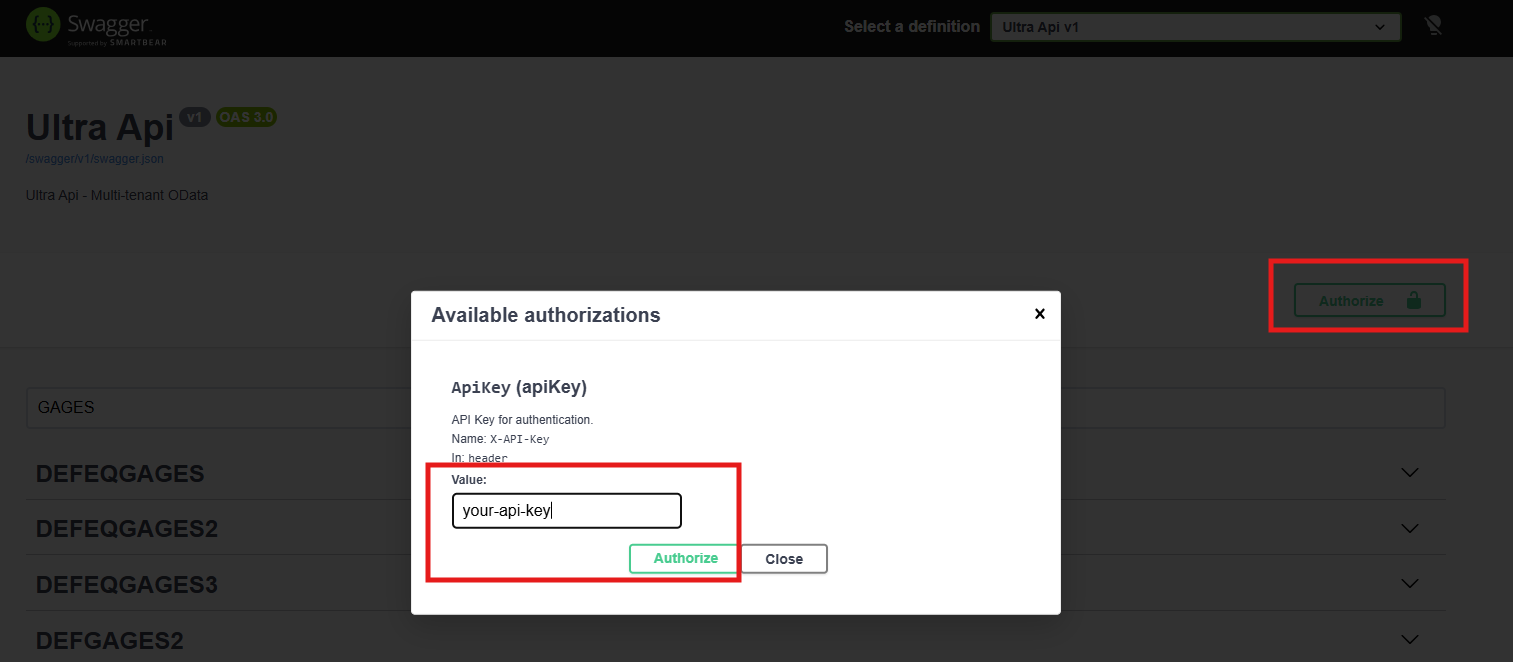
Steps to authenticate:
Open the Swagger URL for your environment in a web browser.
Click the Authorize button (lock icon at the top of the page).
In the Value field, enter your API Key.
Click Authorize, then Close.
All subsequent requests made through Swagger will include your API Key automatically.
Swagger UI Features
When browsing entities in Swagger, the following metadata is available to help you build correct requests:

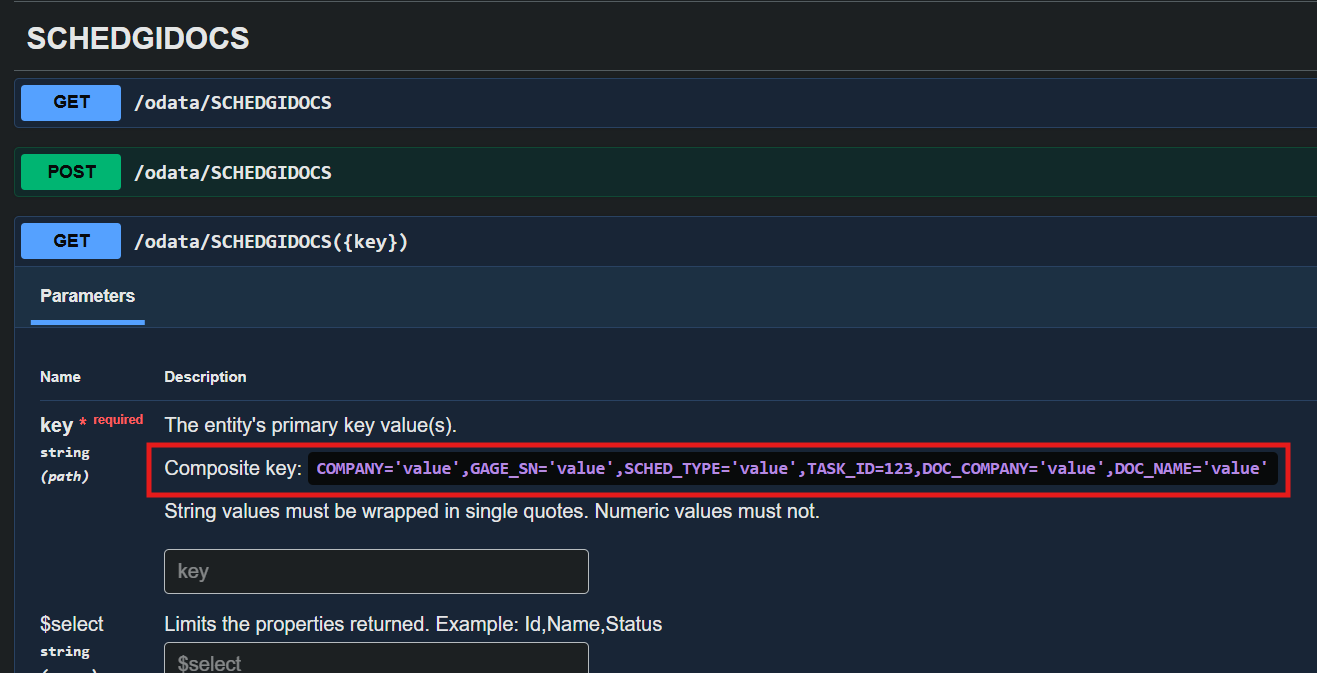
Primary Key identification — Each entity's schema displays its primary key fields (e.g., Primary Key: COMPANY, GAGE_SN), so you know exactly which fields are required for GET by key, PUT, PATCH, and DELETE operations.
Maximum field length — String fields display their maxLength constraint directly in the schema. Always check this before sending data to avoid truncation errors.

Configuration & Limits
| Setting | Value |
|---|---|
| Max results per page | 100 |
| Max $top value | 100 |
| Max $expand depth | 3 levels |
| Max filter node count | 100 |
| Max any/all expression depth | 2 |
| Case-insensitive URIs | Yes |
OData Metadata Levels
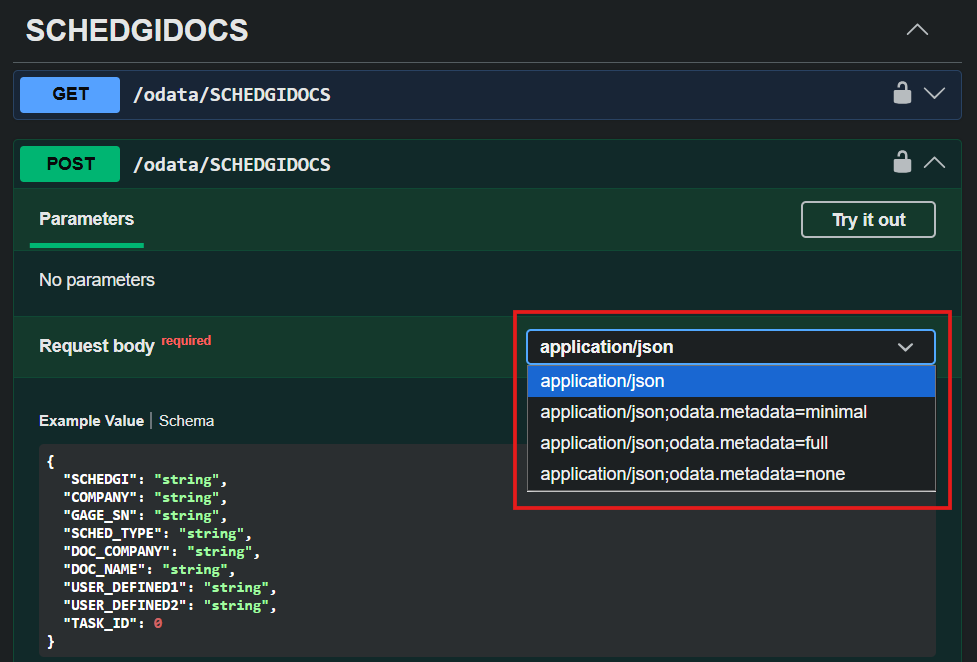
By default, OData responses include minimal metadata — only the essential data fields you requested. However, you can control how much metadata the API returns by setting the Accept header with different metadata levels.
| Level | Accept Header Value | Description |
|---|---|---|
| Minimal (default) | application/json;odata.metadata=minimal | Returns only the data fields. No @odata.id, @odata.type, or @odata.editLink properties are included. This is the default behavior when no Accept header is specified. |
| Full | application/json;odata.metadata=full | Returns all OData metadata properties alongside the data, including @odata.id, @odata.type, and @odata.editLink for each record. |
| None | application/json;odata.metadata=none | Returns only raw data with no OData metadata at all — not even the @odata.context URL. |
When to Use Full Metadata
Use odata.metadata=full when you need:
@odata.id: The unique OData URI for each record (useful for referencing or linking records).
@odata.type: The fully qualified entity type name.
@odata.editLink: The URL to use for updating or deleting the record.
Note: Full metadata increases the response payload size. Use it only when you specifically need the @odata.id, @odata.type, or @odata.editLink properties. For general data queries, the default minimal metadata is recommended.
Key Format
When accessing a single entity by its primary key, use the following format in the URL:
Single key (integer):
/odata/ENTITY(42)
Single key (string) — must use single quotes:
/odata/ENTITY('ABC-123')
Composite key (multiple fields):
/odata/ENTITY(COMPANY='ABCDE',GAGE_SN='ABCDE')
Important: String values in keys must always be wrapped in single quotes (').
Date Filtering Best Practice
When filtering by date fields, always use the full ISO 8601 datetime format with the T separator and timezone designator:
Recommended (fast):
GET /odata/EVENTS?$filter=EVENT_DATE gt 2025-01-01T00:00:00Z
Avoid (may be slow on large tables):
GET /odata/EVENTS?$filter=EVENT_DATE gt 2025-01-01
The short date format (2025-01-01) is interpreted as a date-only value, which can prevent the database from using indexes efficiently on datetime columns — especially on large tables like EVENTS. The full datetime format (2025-01-01T00:00:00Z) ensures optimal query performance.
Note: The API includes an automatic conversion layer that handles most cases, but using the full datetime format is still the recommended best practice for consistent, fast results.
Query Examples (GET)
List all records
GET /odata/GAGES
Returns the first page (up to 100 records) of the GAGES entity.
Select specific fields with pagination
GET /odata/GAGES?$top=3&$skip=0&$select=COMPANY,GAGE_SN,GAGE_ID
Returns only the 3 specified fields for the first 3 records.
Get a single record by composite key
GET /odata/GAGES(COMPANY='ABCDE',GAGE_SN='ABCDE')?$select=COMPANY,GAGE_SN,GAGE_ID
Filter + order + count
GET /odata/GAGES?$filter=ISACTIVE eq '1'&$orderby=COMPANY,GAGE_SN&$count=true
Returns only active records, sorted by COMPANY then GAGE_SN, with the total count included in the response.
String filter operations
Contains:
GET /odata/GAGES?$filter=contains(GAGE_SN,'SN-100')
Starts with:
GET /odata/GAGES?$filter=startswith(MANUFACTURER,'Fluke')
Expand navigation property with sub-filter
GET /odata/GAGES?$filter=ISACTIVE eq '1'
    &$expand=SCHEDGI(
        $filter=SCHED_TYPE eq 'CALIBRATION'
            and SCHED_DUE_DATE ge 2026-01-01T00:00:00Z
            and SCHED_DUE_DATE le 2026-03-31T23:59:59Z;
        $select=SCHED_TYPE,SCHED_FREQ,SCHED_INTERVAL,SCHED_LAST,SCHED_DUE_DATE
    )
    &$select=COMPANY,GAGE_SN,GAGE_ID,MANUFACTURER,MODEL_NUM
    &$orderby=COMPANY,GAGE_SN
This query retrieves active equipment and expands their related schedules, filtering only calibration schedules due in Q1 2026.
Create, Update, and Delete
Create a new record (POST)
POST /odata/GAGES
Content-Type: application/json

{
  "COMPANY": "ACME",
  "GAGE_SN": "SN-NEW-001",
  "GAGE_ID": "New Equipment",
  "MANUFACTURER": "Fluke",
  "MODEL_NUM": "Model-X"
}
| Response | Meaning |
|---|---|
| 201 Created | Record created successfully |
| 409 Conflict | A record with the same key already exists |
Full update — PUT (upsert)
Replaces all fields of an existing record. If the record does not exist, it creates it.
PUT /odata/GAGES(COMPANY='ACME',GAGE_SN='SN-NEW-001')
Content-Type: application/json

{
  "COMPANY": "ACME",
  "GAGE_SN": "SN-NEW-001",
  "GAGE_ID": "Updated Equipment Name",
  "MANUFACTURER": "Fluke",
  "MODEL_NUM": "Model-Y"
}
| Response | Meaning |
|---|---|
| 204 No Content | Record updated successfully |
| 201 Created | Record did not exist and was created |
Partial update — PATCH
Updates only the specified fields, leaving all other fields unchanged.
PATCH /odata/GAGES(COMPANY='ACME',GAGE_SN='SN-NEW-001')
Content-Type: application/json

{
  "MANUFACTURER": "Keysight"
}
| Response | Meaning |
|---|---|
| 204 No Content | Record updated successfully |
| 404 Not Found | Record with the specified key does not exist |
Delete a record (DELETE)
DELETE /odata/GAGES(COMPANY='ACME',GAGE_SN='SN-NEW-001')
| Response | Meaning |
|---|---|
| 204 No Content | Record deleted successfully |
| 404 Not Found | Record with the specified key does not exist |
Note: Create, Update, and Delete operations require a Writer role API Key. If you have a Reader key, these operations will return 403 Forbidden.