Migrate Pipette Settings
If you've been using a version of the Pipette Module from 12.1 or earlier and are now upgrading to 12.2 or later, run the MIGRATE PIPETTE SETTING equipment project script. (See Update Layouts for how to expose the hyperlink.)
In older versions of the Pipette Module, Pipette Method Setup settings (and Pipette Balance Setup settings, for some customers) were stored in Extended Attributes. This script moves those settings to the Specifications for your gages and templates so they continue to work.
Running the migration
Click the hyperlink to launch the project script.
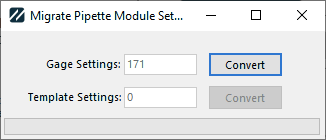
Migrate Pipette Setting dialog
You're shown a count of the gage settings and template settings in your database. Click Convert for Gage or Template Settings to convert those items. The progress bar at the bottom indicates progress. Depending on how many gages and templates you have, this can take from less than a second to a few minutes.
You only need to run this once. After it has run successfully, you can delete the MIGRATE PIPETTE SETTING hyperlink.