Notes for Admins.
When distributing the Web-Tier Tools installation file, you can either distribute it manually or set up an automatic download link on the main IndySoft client Dashboard screen.
Naming the executable for distribution
If your users will be connecting to a 3-tier IndySoft Application Server, you can embed the server's name and port number directly into the installer file name. This gives users a seamless installation without having to manually specify connection settings, and lets you also specify the database type that they'll be connecting to. The IndySoft Web-Tier Tools installer is in the same directory where you installed your IndySoft WebTier application.
Database type codes
The default database type is Firebird — if no 3-letter code is in the .exe name, Firebird is assumed.
SQL— Microsoft SQL ServerORA— OracleHTTPS— Use HTTPS for 3-tier connectionsUNI— Use Unicode for 3-tier connections
All codes go in the filename before the word SERVER (described below).
Specifying a 3-tier server and port
To specify a 3-tier server and port, include the word SERVER in the filename, preceded by the server name and a comma separating the port number.
For example, for an SQL Server-based IndySoft client connecting to a server indysoft.ninja on port 9501:
IndySoftWebTierToolsSQLSERVERindysoft.ninja,9501.exe
To also enable HTTPS and Unicode:
IndySoftWebTierToolsSQLHTTPSUNISERVERindysoft.ninja,9501.exe
Using HTTPS requires that your 3-tier IndySoft Application Server is already set up to support HTTPS with an appropriate digital certificate.
Setting up an automatic download link from the IndySoft client Dashboard
The most efficient way to distribute the Web-Tier Tools installer is to set up a download link on the IndySoft Web-Tier client Dashboard screen.
- Open the LayoutBuilder application and edit a Home view.
- Add some text indicating that clicking the link will download the Web-Tier Tools installation file.
- Use the
Web-TierTOOLShyperlink for the action.
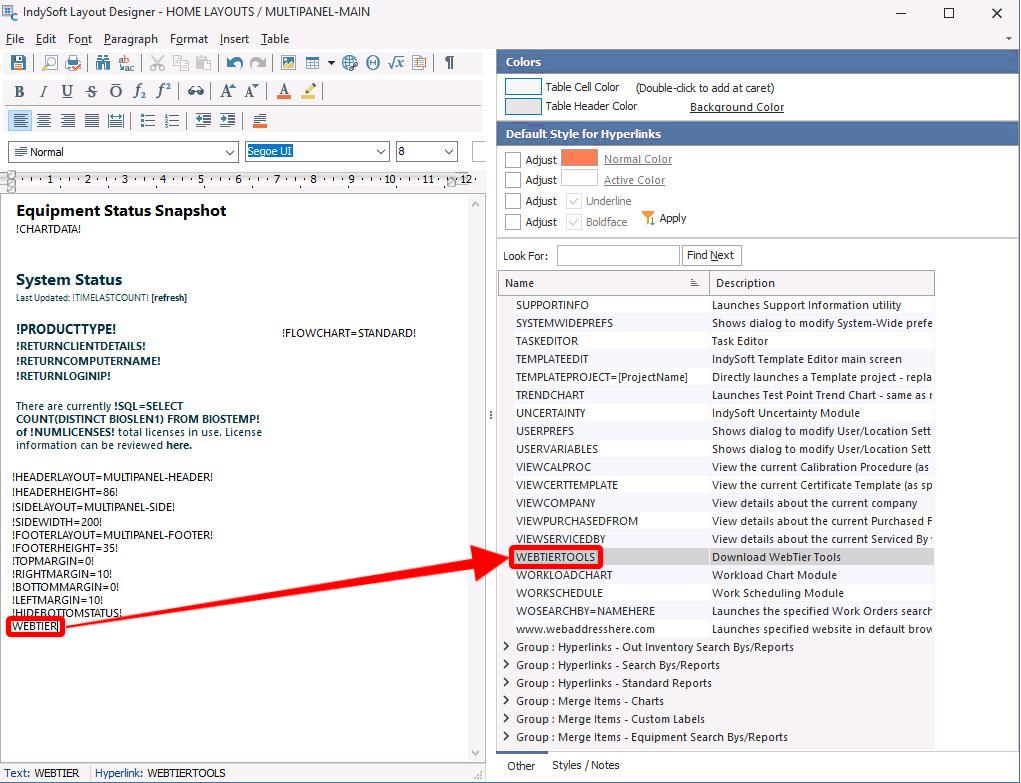
LayoutBuilder — custom hyperlink for Web-Tier Tools
By default the downloaded file is named IndySoftWebTierTools.exe. You can have the browser save it with a custom prefix instead — open System Wide Preferences and create a variable called WEBTIERINSTALLNAME. The prefix you specify is prepended to the installation file name on download.
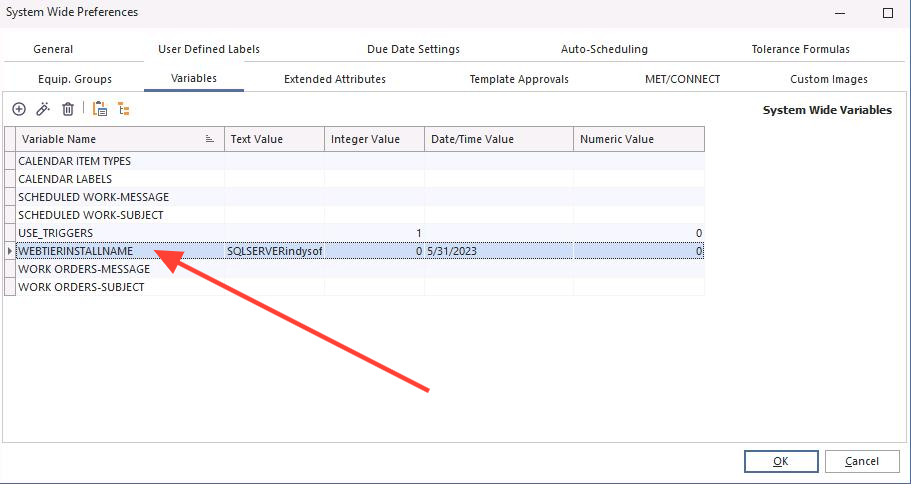
System Wide Preferences — system variable for custom Server/Port IndySoft Web-Tier file name
Set the Text Value option, as shown below.
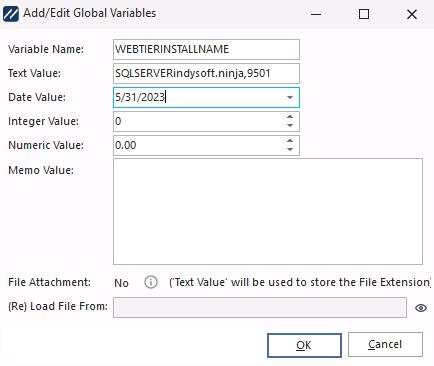
WEBTIERINSTALLNAME global variable