Advanced RS232
For some balances, getting the connection settings right can be tricky. The Advanced RS232 dialog (see Update Layouts) replaces the legacy Test RS232 and exposes detailed communication settings.
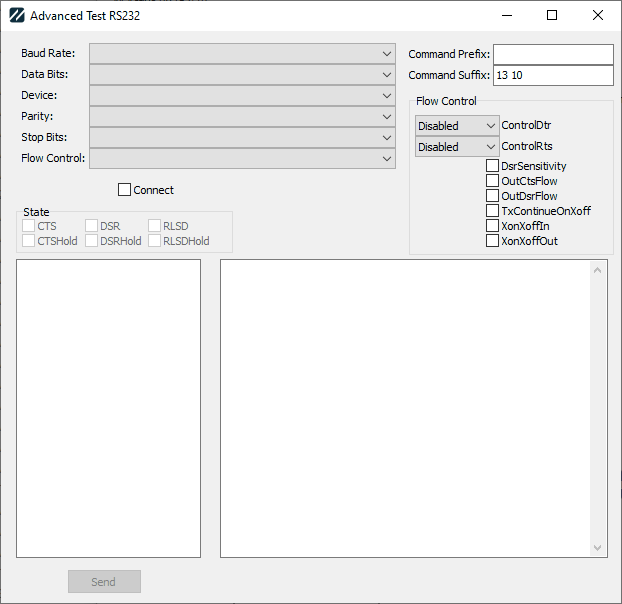
Advanced RS232 dialog
Communication settings
- Baud Rate — the speed the RS-232 device communicates at.
- Data Bits — the number of data bits used in communication. Options: 4, 5, 6, 7, or 8 (7 and 8 are most common).
- Device — the COM port to connect to, from
COM1toCOM255. - Parity — communication parity. Options: None, Odd, Even, Mark, or Space.
- Stop Bits — the number of stop bits. Options: 1, 2, or 1.5.
Flow Control
Flow Control dictates how the device and computer negotiate communication. When you select a choice in the drop-down, the corresponding properties are reflected in the Flow Control box to the right.
There are three basic options, plus tweaks:
| Option | Effect |
|---|---|
| None | Disables all controls, but does check DsrSensitivity. |
| Rts Cts / Hardware | Sets ControlRts to Handshake, checks OutCtsFlow, and checks DsrSensitivity. |
| Xon Xoff / Software | Checks XonXoffIn and XonXoffOut, along with DsrSensitivity. |
The tweaks (combinable with any of the above):
| Tweak | Effect |
|---|---|
| Dtr Dsr | Sets ControlDtr to Handshake, and checks OutDsrFlow. |
| No Dsr Sens | Unchecks DsrSensitivity. |
| TxCon | Checks TxContinueOnXoff. |
You can also experiment with the drop-down and checkbox options in Flow Control directly, ignoring the Flow Control drop-down's preset choices.
Command prefix and suffix
- Command Prefix — Some balances require a special prefix to indicate a command. Enter the decimal values for the ASCII characters to use as the prefix.
- Command Suffix — Balances generally require a special sequence at the end of a command. The default is
CR LF(decimal13 10). Enter the decimal values for the ASCII characters.
Connecting and testing
- Connect — attempts to connect to the device. If successful, the State box shows the various pin states in the RS-232 communication, useful when debugging connections.
- Left-hand memo — type commands to send (click Send to transmit).
- Right-hand memo — lists messages sent and received, including plain-text and hex values.
note
Responses from the device may be split into multiple messages. This is normal.