Pipette Balance Setup
Pipette Balance Setup is similar to Pipette Method Setup. (See Update Layouts for setup.) It saves its settings in the Specs (Uncertainty Attributes) tab.
You must run Pipette Balance Setup against a balance before you can automate readings from it in a Pipette Calibration event.
If you're using Web Tier, you'll need to use Web Tier Tools to collect the data in the calibration event. You may want to use the Web Tier Tools version of Pipette Balance Setup from within the pipette cal event.
Stored entries (IS_PIP table, Text Value BALANCE)
| Table Entry | Type |
|---|---|
AUTO_MODE | Text |
AUTOCOMMIT | Yes/No |
CHANNELS | Numeric |
COM_PORTS | Numeric |
DEVICE_TYPE | Text |
IP_ADDRESS | Text |
PORT | Numeric |
PORT/BAUD | Text |
PORT/DATA_BITS | Numeric |
PORT/FLOW_CONTROL | Text |
PORT/PARITY | Text |
PORT/PORT | Text |
PORT/STOP_BITS | Numeric |
PREFIX | Text |
SAMPLE | Text |
SUFFIX | Text |
TARE | Text |
TARE_CHECKS | Numeric |
UNIT | Text |
ZERO | Text |
Device type
The first step is to choose the device type. There are four options:
- RS-232 — a balance that communicates via RS-232, with a single pan for collecting readings.
- Sartorius SpeedCal — a Sartorius SpeedCal Mobile balance. Communicates over HTTP, with 12 channels for readings by default.
- METTLER MCP 105 — a Mettler Toledo MCP 105 multi-channel balance. Communicates over a single RS-232 connection, with 12 channels for readings by default.
- MULTI-RS-232 — a multi-channel balance such as the Sartorius SpeedCal Classic, where each channel has its own RS-232 connection. The Sartorius SpeedCal Classic has 12 channels with 12 RS-232 connections.
Auto Mode options
Three options:
- None — no automatic taring or zeroing of the balance after readings are taken.
- Tare After Reading — sends a Tare command after a reading is taken. Don't use this with a pipette that isn't using
- TAREoptions in its Pipette Method Setup. - Zero After Reading — sends a Zero command after a reading is taken. Don't use this with a pipette that isn't using
- TAREoptions in its Pipette Method Setup.
Tare Confirmation Attempts
Tare Confirmation Attempts can range from 0 to 5:
- 0 — no attempt is made to confirm that the balance returns 0 after tare or zero.
- 1–5 — attempts up to that many times to confirm the balance returns 0 after the tare.
Closing the dialog
Regardless of device type, you have two options to close Pipette Balance Setup:
- OK — saves the settings to the balance and closes.
- Cancel — closes without saving changes.
Per-device options
RS-232
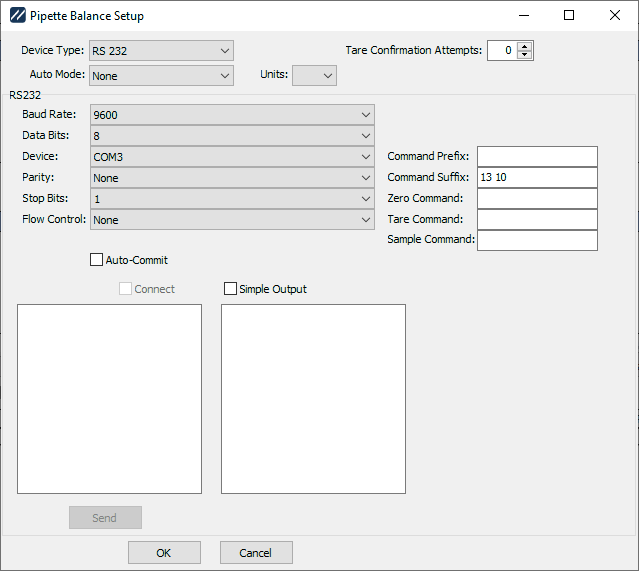
RS-232 settings
The RS-232 option lets you select the connection settings (see Advanced RS232 for details). Other options:
- Auto-Commit — when checked, readings received are automatically added as a sample, with logic for calculating volume from weight applied. When unchecked, you can preview readings before applying them.
- Command Prefix — Some balances require a special prefix to indicate a command. Enter the decimal values for the ASCII characters to use as the prefix.
- Command Suffix — Balances generally require a special character sequence to indicate end-of-command. Default:
CR LF(decimal13 10). - Zero Command — plain-text command for zeroing the balance.
- Tare Command — plain-text command for taring the balance.
- Sample Command — plain-text command for sampling the balance.
- Connect — connects to the balance and confirms settings. Type commands in the left-hand memo and click Send to transmit (with prefix and suffix applied). Responses appear in the right-hand memo.
- Simple Output — suppresses timestamps and hex output, which can make confirming data easier.
Sartorius SpeedCal
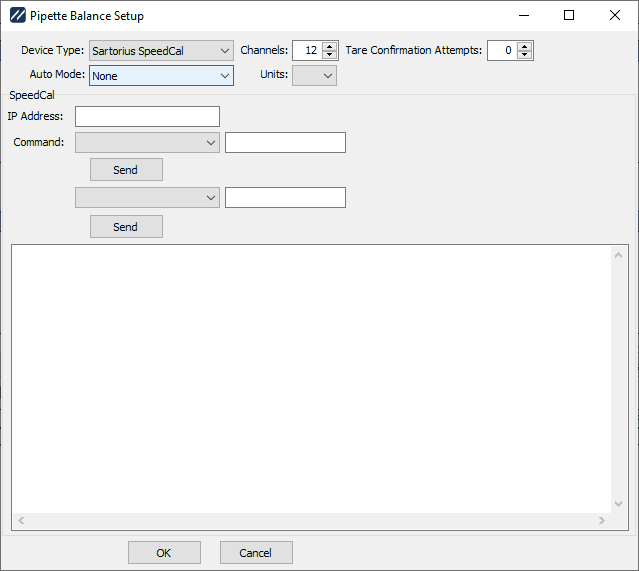
Sartorius SpeedCal settings
Two new selections plus testing:
- Channels — the number of channels the balance has. Default: 12.
- IP Address — the IP address of the balance for sending commands.
- Command — two drop-downs to select various commands for testing. Some commands have extra parameters that go in the edit box after the drop-down. Click Send to issue the selected command. Results appear in the memo below.
METTLER MCP 105
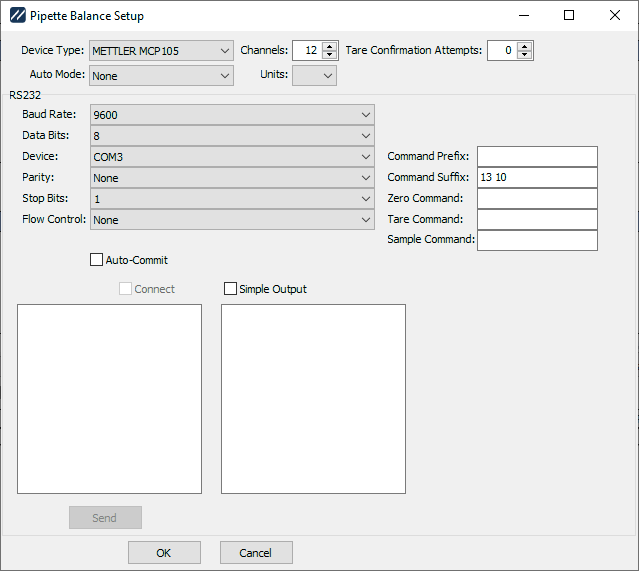
METTLER MCP 105 settings
Same options as RS-232, plus:
- Channels — the number of channels the balance has. Default: 12.
MULTI-RS-232
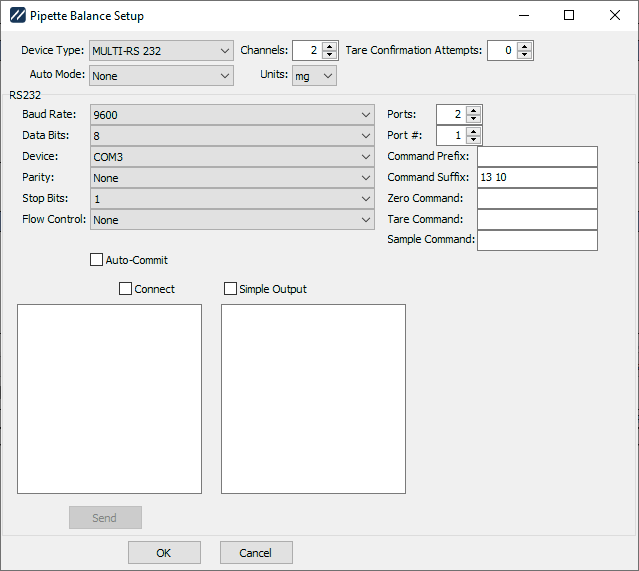
MULTI-RS-232 settings
Same options as RS-232, plus:
-
Channels — the number of channels the balance has. Minimum: 2.
-
Ports — the number of RS-232 ports the device uses. Defaults to the same as the number of channels.
cautionDon't configure a different number of ports and channels.
-
Port # — the port currently being configured.