Pipette Method Setup
Setting up the logic for how calculations should be performed is handled by an equipment custom rule called PIPETTE METHOD SETUP, which you can place on your Equipment or Template layout. (See Update Layouts.)
It reads and saves settings into the Specification entries in the IS_PIP table that has Text Value PIPETTE. If you have settings in extended attributes from an earlier version, launching PIPETTE METHOD SETUP reads those values and transfers them to Specifications as needed.
Stored entries (IS_PIP table, Text Value PIPETTE)
| Table Entry | Type |
|---|---|
MODE | Text |
NUMBER SAMPLES | Numeric |
NUMBER SAMPLES2 | Numeric |
EVAP BLANK INTERVAL | Numeric |
COLLECT DATE BY | Text |
CALCULATE AFTER | Text |
USE CYCLE TIMER | Yes/No |
CYCLE MINUTES | Numeric |
CYCLE SECONDS | Numeric |
USE TEMPERATURE | Yes/No |
USE BAROMETRIC PRESSURE | Yes/No |
USE REL HUMIDITY | Yes/No |
USE DENSITY | Yes/No |
DENSITY | Numeric |
CHECK ACCURACY | Yes/No |
CHECK PRECISION | Yes/No |
CALC TYPE | Text |
CUBIC EXPANSION COEFF | Numeric |
CHANNELS | Numeric |
CHANNEL ROWS | Numeric |
CHANNEL SPACING | Text |
Method Setup screen
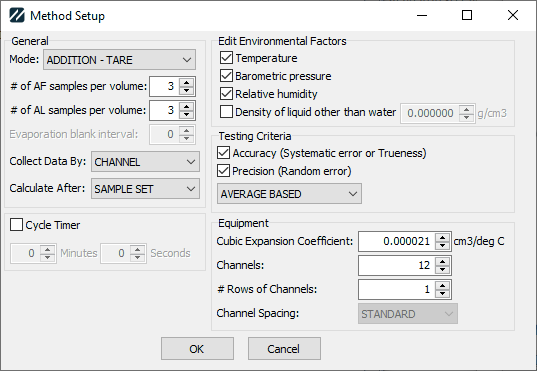
Pipette Method Setup screen
Mode
Mode indicates how successive samples from the balance should be interpreted:
ADDITION— adding volume to the balance without taring between samples. The amount logged is the difference between the current and previous sample.ADDITION - TARE— adding volume to the balance and taring between samples. The amount logged is the reading from the balance.SUBTRACTION— removing volume from the balance without taring between samples. The amount logged is the difference between the previous and current sample.SUBTRACTION - TARE— removing volume from the balance and taring between samples. The amount logged is the negative of the reading from the balance.
Sample counts
- # of AF Samples per volume — default number of samples for As Found readings.
- # of AL Samples per volume — default number of samples for As Left readings.
Other settings
- Evaporation blank interval — when not taring between samples, how often to pause sampling to calculate the evaporation rate of the liquid. Best used with the Cycle Timer for consistent evaporation rates.
- Collect Data By:
SAMPLE— by default, collect sample 1 across all channels before collecting sample 2.CHANNEL— by default, collect all samples for channel 1 before collecting samples for channel 2.
- Calculate After:
EACH SAMPLE— accuracy, precision, and uncertainty calculate after every sample. Slower, but gives the technician earlier feedback if there's an issue.SAMPLE SET— accuracy, precision, and uncertainty calculate only when the last sample for a channel/volume is collected. Faster, but less feedback.
- Cycle Timer — when checked, displays a countdown timer that resets to the indicated minutes/seconds after every sample. Mainly useful with
ADDITIONandSUBTRACTIONmodes for consistent evaporation, so the evaporation can be accounted for when collecting samples. - Temperature — when checked, use the temperature from the event when calculating the Z-factor. Otherwise, use 70 °F.
- Barometric Pressure — when checked, use the BP from the event when calculating the Z-factor. Otherwise, use 760 mm Hg.
- Relative Humidity — when checked, use the RH from the event when calculating the Z-factor. Otherwise, use 70%.
- Density of liquid other than water — when checked, use the indicated value as the density. Otherwise, calculate the density of water based on temperature.
- Accuracy — whether the Mean (
AVERAGE BASED) or Max (INDIVIDUAL BASED) deviation from nominal will be used in calculating results. - Precision — whether standard deviation will be used in calculating results.
- Cubic Expansion Coefficient — the cubic expansion coefficient of the pipette. Used in calculating the Y-value.
- Channels — the number of channels in the pipette.
- # Rows of Channels — the number of rows the channels are arranged in.
- Channel Spacing — for pipettes with multiple channels, indicates
STANDARDor1/2 STANDARDspacing. With a multi-channel balance,1/2 STANDARDcollects readings by odds/evens instead of sequentially.