Event Finish
The Event Finish screen is the last screen before completing Calibration Data Collection.
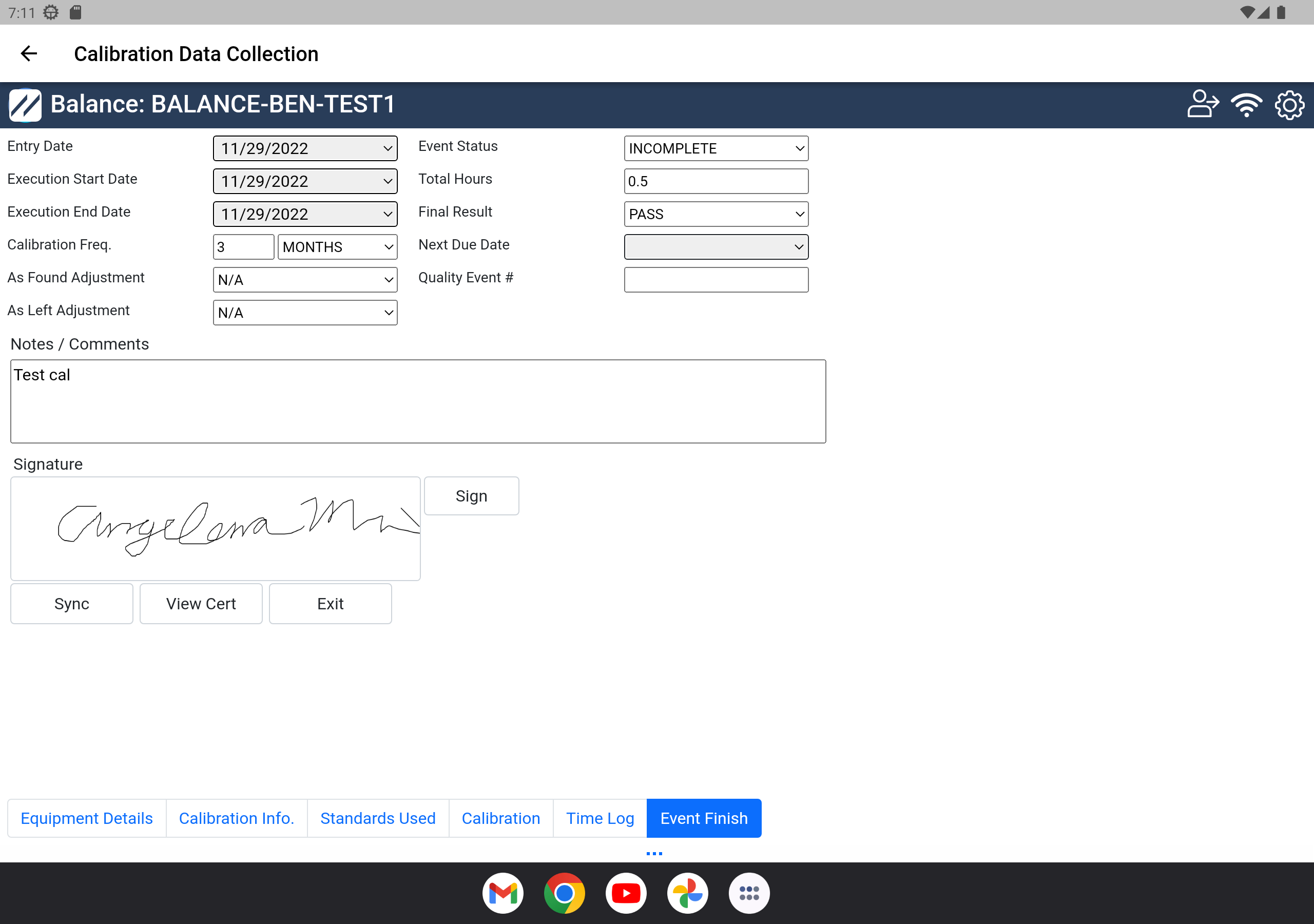
Event Finish — Step 6
The last step is to enter or confirm basic information:
- Entry Date — defaults to the current date of the calibration entry
- Execution Start Date — defaults to the date the calibration execution started
- Execution End Date — defaults to the date the calibration execution completed
- Calibration Freq — check or adjust the calibration schedule frequency / interval
- As Found Adjustment — displays whether the As Found results were adjusted
- As Left Adjustment — displays whether the As Left results were adjusted
- Event Status — current status of the event
- Total Hours — total time the calibration took (can be auto-calculated from time-log entries)
- Final Result — the final result of the event according to the Calibration Results tab
- Next Due Date — next due date, if a current schedule is in place
- Quality Event #
- Notes / Comments — any relevant notes about the calibration
- Signature — section for the technician signature at the end of the event
When complete, tap the Sync button below the signature section. The calibration is submitted to the IndySoft database when an online connection is available. The certificate of calibration is generated, and the work order is automatically completed.