Test Points
The Test Points tab is quick and easy to use. It lets you enter established test-point data, or use IndySoft's test-point results data. If your test-point data is in an Excel spreadsheet, select the document and use it during the calibration event as the test results.
There are several ways to use test-point data, but here we'll look at setting up a basic test-point results screen.
Test Points toolbar

Test Points toolbar
The Test Points toolbar contains, from left to right:
- Toggle Default Tolerance
- Tolerance Calculator
- Specify Error
- Calibration Setup Wizard
- Cut
- Copy
- Test Point Duplicator
- Edit Multiple Rows
- Test Point Type
For more on these icons, see the IndySoft user help manual.
Entering test points manually

Entering test points
You can also set up test points by typing the information per line and column.
To manually enter test points, click the Toggle Default Tolerance icon  on the far left of the toolbar. The tolerance dialog opens.
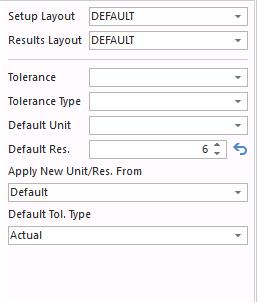
Default tolerance dialog
Set up the data:
- Select your Tolerance Type —
Asymmetricallets you enter both plus and minus tolerance values for each test point. - Set tolerance to
0.25for each type. - Set Default Unit of Measure to
Millimeters. - Set Default Resolution to
3. (Default Resolution is the number of digits to the right of the decimal point.) - Save the test-point information.
Entering test-point values
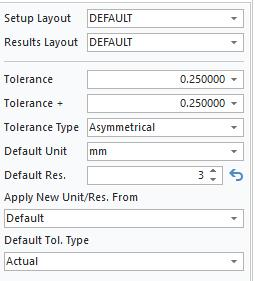
Entering test-point values
Begin entering the following information in the test-point grid:
Description: Test 1
Standard:    25  → arrow down
Standard:    30  → arrow down
Standard:    35  → arrow down
Standard:    40  → arrow down
Standard:    45  → arrow down
Standard:    50  → arrow down
These values don't reflect real test-point data — they're just examples to demonstrate how plus / minus tolerances work when values are placed in the Standard field.
These test points are now available for use during the Calibration event.
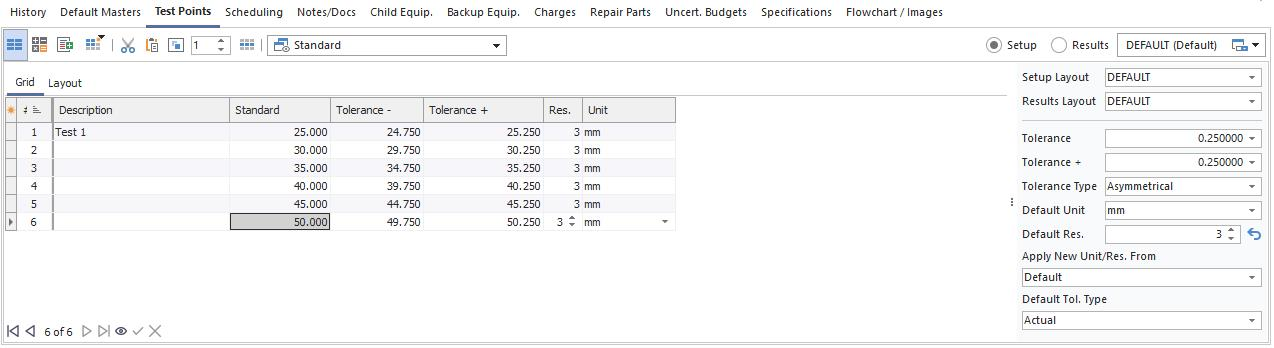
Test points ready for use